


Facial Mocap, Made Simple.
Capture facial animation with nothing but your iPhone — no mocap helmet, no studio, no subscription.
AnimStarter Face Mocap turns your iPhone's TrueDepth camera into a face-capture rig. Perform, watch the blendshapes fire live as you act, and export clean, open-format animation data you can use in any 3D pipeline. You get a solid, structured performance baseline in seconds — so your time goes into the acting, not keying mouths by hand.
The app is 100% free.

Download on the App Store
It's super simple:
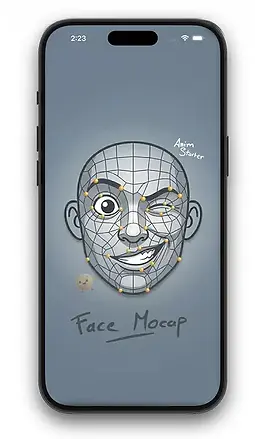
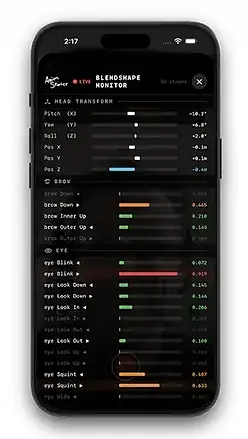
1. Record. Open the app and perform — watch the live blendshapes trigger in real time as you record yourself.
2.Transfer. Send the files to your computer. You instantly get a reference video (.mov), clean audio (.wav), animation curves (.asfm), and an optional math-corrected version (_solved.asfm).
3. Use it anywhere. The .asfm format is an open, documented CSV — drop it into Autodesk Maya, Blender, Unreal, or your own custom pipeline.

Why animators love it
-
Instant Dialogue Blocking. It won't replace your artistry — it hands you a solid, structured performance baseline in 60 seconds. Organic head-motion curves, natural eye blinks, and primary mouth shapes land on your timeline on the first pass, so you spend your energy refining the acting instead of wrestling with empty keys (cutting layout time by up to 80%).
- Zero-Friction Audio Sync. Perfect lip-sync out of the box. The moment you hit stop, the app extracts an uncompressed, studio-ready .wav (16-bit / 44.1kHz / mono) sharing the exact same filename and timecode as your motion data — so everything lines up down to the millisecond, automatically.
-
Open by design. Every take exports universal files (.mov, .wav, .asfm). No lock-in, no proprietary container, the .asfm output even opens as a plain .csv
Going further : the ASFM Importer for Maya
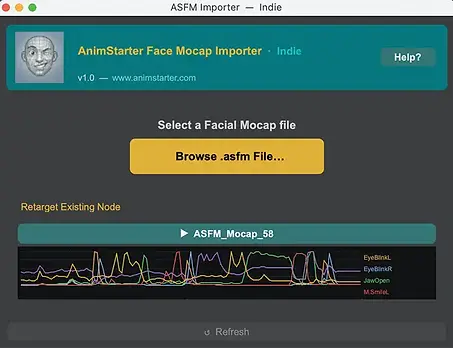
The iPhone app gives you clean, open capture data that works anywhere. If you live in Autodesk Maya, the optional ASFM Importer turns that data into a true one-click retargeting workflow — built by an animator, for animators.
-
One-Click Rig Profiles (.asprofile). Connect the 52 capture channels to your custom character controls once, save it as a master profile (e.g. MyRigProfile.asprofile), and load it instantly for every future take. Map once, reuse forever.
-
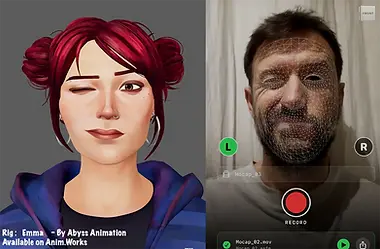
Studio-ready transfer. Push organic head motion, blinks and mouth shapes straight onto your rig, perfectly timed to the synced audio.
-
DRM-free & offline. No floating license servers to crash during late-night deadlines, no subscriptions. Buy it once, own it forever.
🌟 ASFM Importer — One-Time Pricing
License | Seats & Deployment | Price (One-Shot) | Ideal For |
|---|---|---|---|
iOS Capture App | Free download, unlimited takes, real-time HUD monitor. | $0 (Free) | Animators, actors, and students. |
Indie License | 1 unique user | $49 | Solo animators and freelancers. |
Studio Pack | Up to 10 concurrent seats on a single physical site. | $350 | Boutique studios, ad agencies, and indie game teams. |
Enterprise | Unlimited seats (Global Site License) for an entire studio or campus. | $990 | Established VFX/AAA production houses and schools. |
📱 Geek Corner — what's under the hood
For the technically curious.
-
Capture: 52 ARKit blendshapes + 6-axis head transform, recorded at 60 FPS from the TrueDepth sensor.
-
Adaptive smoothing — One Euro Filter: kills micro-jitter without adding lag. Three presets: Light (fast, hyper-expressive action), Standard (dialogue — 90% of cases), Heavy (slow, subtle close-ups).
-
Vertex Solver (optional): for maximum accuracy it reads the raw 1,220-vertex face mesh and runs an on-device NNLS ridge-regression solve (via Apple's Accelerate framework), producing blendshape weights tuned to your face shape in a separate _solved.asfm. Eyes, eyelids and brows stay on ARKit's native tracking, where it's strongest.
-
One-time calibration (~35s): follow the on-screen emoji prompts once per performer; the solver basis is saved on-device for all future takes.
-
Open .asfm format: a documented CSV — Timecode + 52 blendshapes + 6-axis head = 60 columns. Optimized for Maya, adaptable to Blender, Unreal, or custom pipelines.
-
Capture tips: soft frontal light, device 35–50 cm from the face, and start each take with 1–2 s of a neutral expression.
❓ FAQ & Support
Do I need Maya to use the app?
No. The app is a fully standalone capture tool. It exports raw, open-standard .asfm (CSV), .wav and .mov files via AirDrop or the iOS Files app ; you can process that data in any spreadsheet, custom script, or 3D software (Blender, Unreal, and more). The Maya ASFM Importer is an optional convenience tool for Maya users only.
How do I get my files off the iPhone?
Use AirDrop or the built-in iOS Files app / share sheet from the in-app take library.
Is my face data private?
Yes. AnimStarter Face Mocap uses your device's TrueDepth camera to track facial movement in real time, solely to generate motion-capture files. No face data is stored on our servers, shared with third parties, or used for identification. All data stays on your device until you choose to export it.
Need help or have a suggestion? Email: animstarter@gmail.com
🛠️ System Requirements & Support
-
iOS Device: Requires an iPhone with a TrueDepth camera (Face ID) running iOS 16.0 or later.
-
Workstation: ASFM importer script compatible with Autodesk Maya (Maya 2022+ supporting Python 3 and PySide2/PySide6).
-
Data Privacy: 100% local-first architecture. TrueDepth camera access is exclusively used to generate capture files locally. No face data is ever collected or stored on servers.
-
Email: animstarter@gmail.com
-
Documentation & FAQ: https://www.animstarter.com/animation-tools/face-mocap
App Support & Legal
Support Contact:
Having trouble with the app or the Maya integration? We’re here to help.
-
Email: animstarter@gmail.com
-
FAQ & Documentation: https://www.animstarter.com/animation-tools/face-mocap
Privacy Policy (TrueDepth API & Face Data):
Face Data Privacy: AnimStarterFaceMocap respects your privacy. The app uses your device's TrueDepth camera system to track your facial movements. This data is used exclusively in real-time to generate motion capture data for your 3D animations. We do not store your face data on our servers, we do not share it with third parties, and it is never used for identification purposes. All generated mocap data remains on your device until you choose to export it.