


Picoprod: The Perfect Production Management Software for 3D Animation

Updated: Apr 8

If you've been following me for a while on AnimStarter, you know I've spent the last 15 years as a 3D animator. I've experienced every studio size and every organizational method imaginable.
Today, I want to talk to you about a crucial topic for the success of any project: finding the right production management software for 3D animation and VFX.
When you launch your own studio, manage a team of freelancers, or direct your own short film, you always face the same dilemma for production tracking.
On one hand, you often start with a simple spreadsheet like Google Sheets. It's easy at first, but very quickly, information gets lost, versions get tangled up, and you have no global vision. On the other hand, you look at industry-standard "production trackers". The problem? They are absolute behemoths, ultra-complex to configure, requiring dedicated developers, and above all, they run on monthly subscriptions that are way too expensive for a small structure.
A middle ground was missing. A tool created by an artist, for artists. That is exactly why I developed Picoprod.
Picoprod: The sweet spot for your animation pipeline
The idea behind Picoprod is to offer you a powerful animation studio management tool that remains instantly accessible and integrates perfectly into your workflow, whether your pipeline is based on Maya or Blender or Houdini.
No heavy installation or complex database: everything runs entirely in your browser, and your data stays local on your machine. You just open it and start organizing your pipeline.

The key features of this new Production Tracker
Here is what makes Picoprod the best ally for planning an animation team:
1. Automated Pipeline Templates
No more manually creating every task for every shot. You create your template once (for example: Modeling → Rigging → Animation → Lighting → Compositing). You apply it to your shot, and the tool automatically generates all the tasks with the right dates and resolved dependencies. (By the way, if you need a refresher on structuring these steps, feel free to reread my article on how a VFX and 3D Animation pipeline works).
2. True studio nomenclature (010, 020...)
Good tracking starts with good naming. Picoprod adopts standard studio nomenclature (Sequence_Shot). The tool encourages you to number your shots by multiples of 10 (010, 020, 030...). Why? To allow you to easily insert forgotten shots or ones added by the director (like a shot 015) without having to renumber everything and break your links.
3. Interactive Gantt Chart: Drag, Drop, and Schedule
Stop fighting with rigid spreadsheets. Production schedules change constantly, and your software should adapt instantly. With Picoprod, the Gantt view is fully interactive. You can easily edit task durations by stretching them, or reschedule entire shots simply by dragging and dropping them along the timeline. It’s designed to keep your pipeline synchronized without the headache.


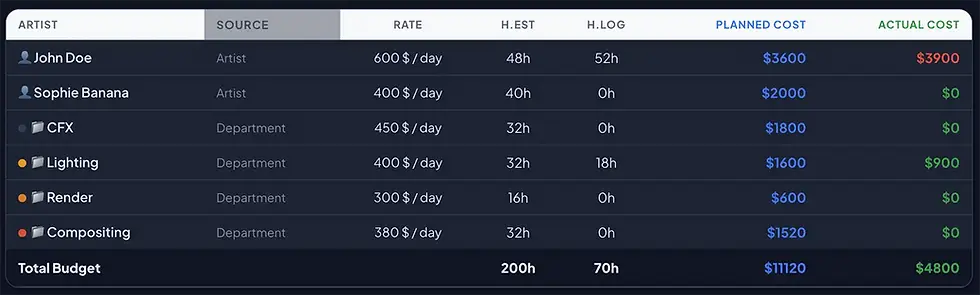
4. Real-Time Budget Tracking for Indie Studios (Pro Feature)
Keeping a close eye on your margins is just as critical as tracking your shots. Picoprod features a built-in budget module designed specifically for animation and VFX projects. It generates live charts to help you monitor your expenses and allows you to instantly export professional, clean PDF or CSV reports to share with your clients or producers.


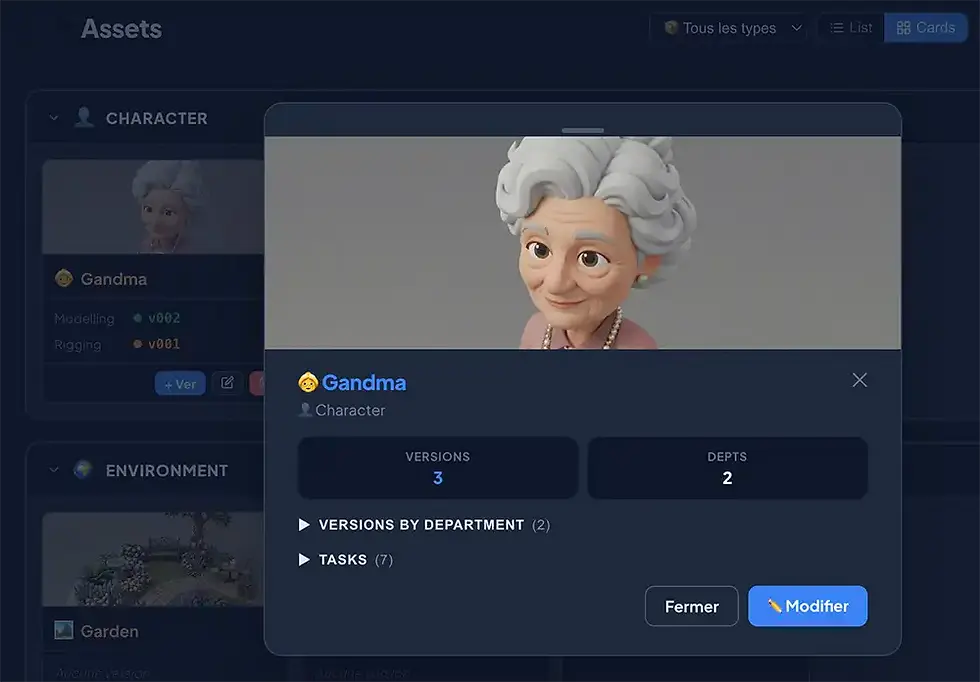
5. Simplified Assets and Shots tracking
You find your whole universe neatly organized. Clicking on an asset or a shot opens a quick "info card". At a single glance, you see the frame range, linked assets, and the complete history of submitted versions by department.
6. Production log and "Client vs. Internal" separation
All notes, retakes, and validation feedback are centralized with an @mentions system. The huge plus? You can tag your notes as "Client" or "Internal". This allows you to easily filter feedback from the director or final client so you can export it separately from your internal technical discussions.

7. Professional PDF Exports for your meetings
Because a production team is constantly communicating, Picoprod generates 6 types of PDF reports in one click. You can export a "To-Do" list for your artists, a "Dailies" report for your daily reviews, or a "Health Check" with global KPIs to reassure your producers. (Add your own Logo to the PDF).
8. Artist Dashboard and Team Workload
As a lead or supervisor, you have access to the team's overall workload to instantly identify who is overloaded. On the artist's side, everyone has a clear, personalized Dashboard with their daily priorities and mini pie charts of progress by department. It's ideal for moving forward stress-free during the morning stand-up.
9. 100% Offline with a collaborative "Merge" system
Your information is private and saved locally on your browser; there is no cloud storage. Working in a group? Picoprod integrates a smart Merge system. It will compile your colleagues' work, synchronize the progress of your tasks, and resolve conflicts without ever overwriting your data.

My choice: A 100% free tool, and a Pro version at $49
I think the monthly subscription model ends up draining the cash flow of independents. That's why I chose to make Picoprod free. You can use it right now to structure your next project without spending a single cent.
And for those who want to go further in customizing their workspace, I created a Pro version for $49. Please note, this is a one-time payment ("one shot"), not a subscription! This upgrade allows you to unlock essential quality-of-life features to fully make the tool your own:
Access to the highly requested Dark Mode, to rest your eyes during long sessions.
The ability to customize your assets with emojis, making your tracking visually unique and even faster to read.
Changing your milestone icons to adapt them to your own workflow.
The addition of custom categories, so the tool bends exactly to your studio's nomenclature.
If you're looking to finally master your animation task tracking without breaking the bank, now is the time to test it out.
Since you're here and I appreciate it, I'm offering you a 50% discount with the code ANIMSTARTER.


Comments